Advertisement
Advertisement
Homepage✕
HomeActions Games

Funny Wheels


Advertisement

Funny Wheels

Advertisement

Funny Wheels Game Introduction

Funny Wheels is a game in which you must apply physics principles. Being a casual and interactive game, you are not in control of a conventional vehicle but instead use a crazy wheelchair, which you steer using the left and right wheels as you navigate through challenges to get to the end of the game.

With amusing ragdoll physics and the easy-to-learn two-button interface, Funny Wheels offers endless fun. Avoid axes swaying in the air, complete hurdles, and race opponents. Even if you fail, you will laugh through your tumbles and appreciate the springboard checkpoints. Will you manage to take control of the wheels and finish the race?
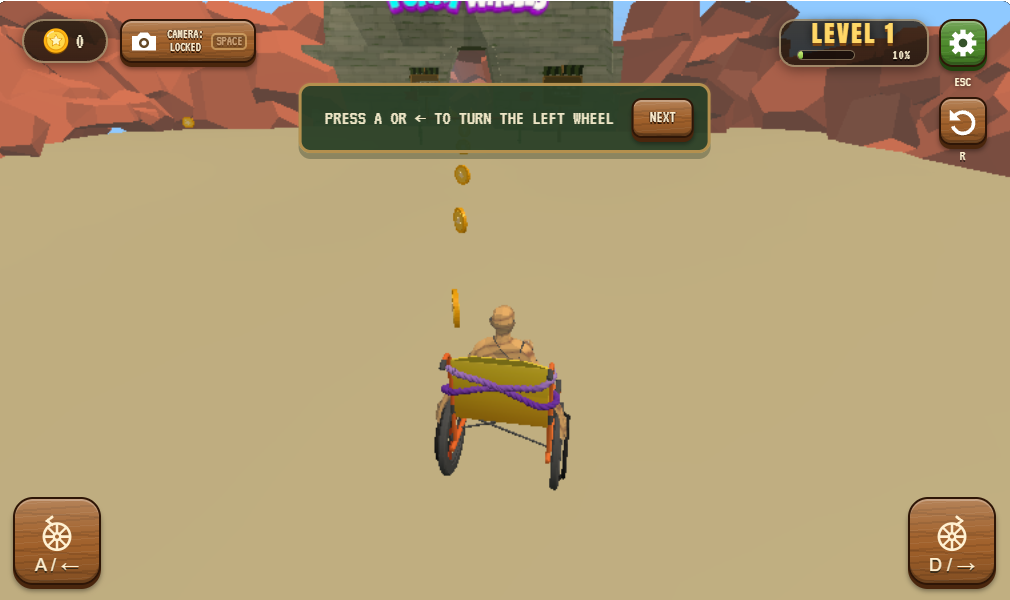
  • Funny Wheels Screenshot

How to Play Funny Wheels

Funny Wheels aims at navigating your wheelchair through challenging obstacle courses and reaching the finish point alive. To overcome the challenges, you need to have mastery over the wheel movements and speed control, as well as a strong reaction time.

  • Pushing the chair: You may move your wheelchair by pushing one of its wheels.
  • Getting started: Start moving by pushing both the wheels together.
  • Beware of obstacles: You must always be aware of obstacles, dangerous surfaces, and swinging axes.
  • Keeping your balance: You need to be very careful while moving, so that your wheelchair does not topple.
  • Using checkpoints: If you do crash, press the R button to move back to the previous checkpoint.
  • Complete the mission: Carry out the activity smoothly and win the game before other players.

Funny Wheels Controls

PC Controls:

  • A / Left Arrow: Push the left wheel.
  • D / Right Arrow: Push the right wheel.
  • A + D: Roll forward.
  • Right Mouse Drag or I/J/K/L: Move the camera.
  • Mouse Wheel: Zoom in or out.
  • Space: Reset camera.
  • R: Respawn at checkpoint.
  • ESC / P: Put the game on hold.

Mobile Controls: To maneuver, you should tap the buttons on the left and right wheels; tapping both wheels will make you move forward, with the swipe option for camera control.

Some Suggestions for Better Performance

  • Try to be concise, yet deliberate with your movements to avoid losing your balance.
  • First, look into how the obstacles react before starting the journey.
  • When on a narrow and possibly risky road, reduce your speed.
  • Take advantage of checkpoints to avoid making mistakes.
  • Use the camera to get a clearer picture of what lies ahead.

Hop onto the Funny Wheels and enjoy an exceptional gameplay experience of outrageous racing, exciting physics tasks, and hilarious crashes.


Discuss: Funny Wheels

New Games